Buying a product online is convenient, but receiving a damaged item can be frustrating. The package may arrive with broken parts, scratches, dents, cracks or other visible damage. In some cases, the outer packaging may look fine while the product inside is damaged.
If this happens, it is important to report the problem properly and as early as possible. Knowing how to contact an online store about a damaged product can help you request a return, replacement, repair or refund, depending on the store’s policy.
Check the Product as Soon as You Receive It
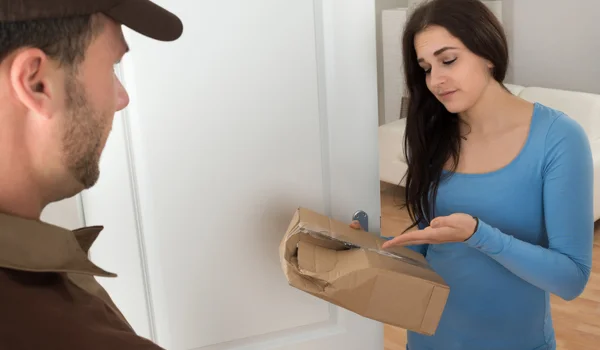
Try to inspect the product soon after delivery.
Check:
- Product condition
- Packaging
- Accessories
- Quantity
- Model or variant
- Visible cracks or scratches
- Broken parts
- Signs of leakage or other damage
- Whether the product works properly
For electronics, appliances and other products that require testing, check whether the item functions as expected.
If you notice damage, avoid using the product unnecessarily until you understand the store’s return or replacement process.
Do Not Throw Away the Packaging
Keep the original packaging after discovering damage.
This may include:
- Outer box
- Inner packaging
- Protective material
- Shipping label
- Product box
- Instruction manuals
- Accessories
The store or delivery company may ask for photographs of the packaging or require the product to be returned in its original packaging.
Take Clear Photographs and Videos
Evidence can be very useful when reporting a damaged product.
Take clear photographs of:
- Damaged area
- Entire product
- Product packaging
- Shipping label
- Product box
- Serial number, where applicable
- Any visible impact marks
If the product has a functional problem, a short video showing the issue may also be useful.
Make sure the photographs are clear enough to show the actual problem.
Check the Order Details
Before contacting the store, open your order information and verify the purchase.
Check:
- Order number
- Product name
- Purchase date
- Delivery date
- Seller name
- Return period
- Replacement availability
- Refund options
The exact options may depend on the product and the store’s terms.
Use the Store’s Customer Support
Most online stores provide a customer-service or Help Centre option for order-related problems.
When possible, start the complaint through the support option linked to the specific order.
You may be asked to select an issue such as:
- Product damaged
- Product defective
- Wrong product received
- Item not working
- Return request
- Replacement request
Selecting the correct category helps direct your complaint to the appropriate support process.
What Information Should You Provide?
When contacting customer care, give clear and relevant information.
| Information | Why It Helps |
| Order number | Identifies your purchase |
| Product name | Identifies the damaged item |
| Delivery date | Establishes when you received it |
| Damage details | Explains the problem |
| Photos | Provides evidence |
| Video | Shows functional problems |
| Packaging condition | Helps assess delivery damage |
| Preferred resolution | Explains what you want |
Avoid giving unnecessary personal or financial information.
Clearly Explain the Damage
Do not simply write:
“Product is damaged.”
Instead, explain exactly what happened.
For example:
“The glass panel was cracked when I opened the package. The outer box also has a visible dent on the side.”
Or:
“The appliance arrived with a broken component and does not switch on after installation.”
A specific description helps customer support understand the problem.
Ask for the Appropriate Resolution
Depending on the product and store policy, you may want:
- Replacement
- Refund
- Repair
- Exchange
- Other applicable solution
Tell the customer-care representative what resolution you are requesting.
For example:
“The product arrived damaged and I would like to request a replacement.”
If replacement is not available, you can ask what refund or repair options are available.
What If the Outer Package Is Damaged?
If the shipping box is visibly damaged, take photographs before throwing it away.
Visible damage may include:
- Crushed corners
- Torn cardboard
- Opened package
- Broken seal
- Water damage
- Puncture marks
Mention the condition of the package when raising your complaint.
For example:
“The outer box was heavily damaged when delivered, and the product inside had a crack.”
What If the Package Looks Fine but the Product Is Damaged?
Sometimes the outer packaging appears normal while the product inside has damage.
You should still report the issue.
Explain:
“The outer packaging was intact, but the product inside was damaged when I opened the package.”
Photographs of both the packaging and the product can help establish the condition in which you received it.
What If the Product Is Not Working?
A product does not always have visible physical damage.
It may arrive with:
- Power failure
- Display problem
- Charging issue
- Software problem
- Broken function
- Missing component
- Manufacturing defect
In such cases, describe the exact problem.
For example:
“The device powers on but the screen does not respond to touch.”
This is more useful than simply saying the product is defective.
Check Whether the Product Has a Replacement Option
Some stores offer replacement for damaged products, while others may provide a refund or repair depending on the item.
Check your order details for the available options.
The policy may differ based on:
- Product category
- Seller
- Type of damage
- Warranty
- Return period
- Replacement availability
Do not assume that every product has the same return or replacement rules.
What If the Return Window Is Almost Over?
If you discover damage close to the end of the return period, report it immediately.
Do not wait until the final day if you already know there is a problem.
When contacting support, mention:
- Delivery date
- Date you noticed the damage
- Current date
- Return deadline
- Nature of the damage
Keep a copy of the complaint or support reference.
What If the Online Store Rejects the Complaint?
Sometimes a return or replacement request may be rejected.
Ask the store to explain the reason.
Possible reasons may include:
- Return period expired
- Product excluded from returns
- Damage considered customer-caused
- Missing accessories
- Warranty-related issue
- Incorrect complaint category
If you disagree with the decision, provide additional evidence and request a review.
Ask for Escalation When Necessary
If the first customer-care representative cannot resolve the problem, request escalation through the store’s formal grievance process.
When escalating, provide:
- Order number
- Original complaint reference
- Date of complaint
- Previous response
- Photographs
- Video evidence
- Desired resolution
A clear timeline can help the next support team understand what has already happened.
Keep a Record of Communication
Maintain records of all important communication.
Save:
- Emails
- Chat conversations
- Complaint numbers
- Order details
- Return requests
- Photos
- Videos
- Refund information
- Replacement information
This becomes especially important if the issue takes several days to resolve.
Sample Complaint for a Damaged Product
You can use the following format when contacting an online store.
Subject: Complaint About Damaged Product – Order [Order Number]
Dear Customer Support,
I received my order on [date], but unfortunately the product arrived damaged.
Order Number: [Order Number]
Product: [Product Name]
Delivery Date: [Date]
Issue: [Describe the damage]
The damage noticed is [briefly explain the problem]. I have kept the original packaging and have photographs showing the condition of the product and package.
I request a replacement/refund for the damaged product.
Please review my complaint and let me know the next steps.
Regards,
[Name]
What If the Product Was Damaged After Delivery?
It is important to distinguish between damage discovered immediately after delivery and damage that occurs later.
If you accidentally damage the product yourself after receiving it, the store’s normal damaged-product policy may not apply.
If the problem develops later because of a manufacturing defect, warranty or repair provisions may apply instead.
Therefore, explain honestly when and how the problem was discovered.
What If the Product Is Under Warranty?
For some products, especially electronics and appliances, the issue may be handled under the manufacturer’s warranty after the applicable return period.
Check:
- Warranty period
- Warranty terms
- Manufacturer support process
- Repair options
- Service-centre requirements
If the store directs you to the manufacturer, keep your purchase invoice because it may be required for warranty service.
What If an Accessory Is Missing?
Sometimes a product is not physically damaged but arrives without an important accessory.
Examples include:
- Charger
- Cable
- Remote
- Adapter
- User manual
- Installation component
- Product-specific accessory
Report the missing component clearly.
Do not automatically report the entire product as damaged if only an accessory is missing.
What If the Wrong Product Is Delivered?
If you received a different product, compare it with your order confirmation.
Check:
- Product name
- Model
- Size
- Colour
- Variant
- Quantity
Then select the appropriate wrong-product or return option.
Take photographs of the product received, including its label, where possible.
Do Not Repair the Product Yourself
If the product arrives damaged, avoid attempting major repairs before contacting the store.
Opening, modifying or repairing the product yourself could complicate a return, replacement or warranty claim.
First report the problem and follow the instructions provided by the store or manufacturer.
Be Careful About Fake Customer-Care Representatives
Customers reporting damaged products may become targets for refund and replacement scams.
Someone may contact you and claim:
“We need your OTP to process the replacement.”
or:
“Pay a small amount to receive your refund.”
Treat such requests with caution.
Never share:
- OTP
- UPI PIN
- Card PIN
- Banking password
- Account password
- Remote-access credentials
Use the store’s own customer-support system whenever possible.
What If You Paid Online?
If you paid by card, UPI, net banking or another digital method, keep the payment record.
If a refund is approved, check that it reaches the appropriate payment account.
If the store says the refund has been processed but the money has not appeared, ask for the refund reference and check with your bank or payment provider if required.
What If You Paid Cash on Delivery?
If you paid cash when the product was delivered, keep the invoice or order record.
If the damaged product is accepted for return and a refund is approved, follow the store’s stated refund procedure.
The refund method can depend on the store’s policy.
Common Mistakes to Avoid
Throwing Away the Packaging
Keep the packaging until the complaint is resolved.
Waiting Too Long
Report damage as soon as you discover it.
Giving an Unclear Description
Explain exactly what is broken, damaged or not working.
Repairing the Product Yourself
Wait for instructions from the store or manufacturer.
Losing the Order Number
Keep the order information available for all follow-ups.
Sending Poor-Quality Photos
Use clear photographs that show the actual damage.
Sharing Sensitive Information
Never provide OTPs, UPI PINs or passwords to someone claiming to process a return or refund.
Common Questions
How should I contact an online store about a damaged product?
Open your order through the store’s app or website and use the Help Centre, customer-care or return option. Select the damaged-product issue and provide clear details and photographs.
What proof do I need for a damaged product?
Useful evidence may include photographs of the product, packaging, shipping label and damaged area. A video may also help if the problem is functional.
Can I request a refund for a damaged product?
Depending on the store’s policy and the circumstances, you may be offered a refund, replacement, exchange or repair.
What if the store rejects my damaged-product complaint?
Ask for the reason and provide additional evidence if available. If necessary, request escalation through the store’s formal grievance process.
Should I keep the original packaging?
Yes. It is generally sensible to keep the product and original packaging until the return, replacement or complaint is completely resolved.
Final Words
Knowing how to contact an online store about a damaged product can make the return or replacement process much easier.
Inspect the product soon after delivery, keep the packaging, take clear photographs and report the issue through the store’s official customer-support system. Provide your order number and a specific description of the damage.
If the store offers a replacement, refund or repair, follow the required process and keep records of your complaint. If the initial response does not resolve the issue, use the available escalation or grievance process.
Most importantly, avoid repairing the product yourself before reporting the damage and never share OTPs, UPI PINs, passwords or confidential banking information with anyone claiming to arrange a refund or replacement.
About the Author